
On this page
- What changed, and when?
- Do all eMudhra SSL certificates need immediate replacement?
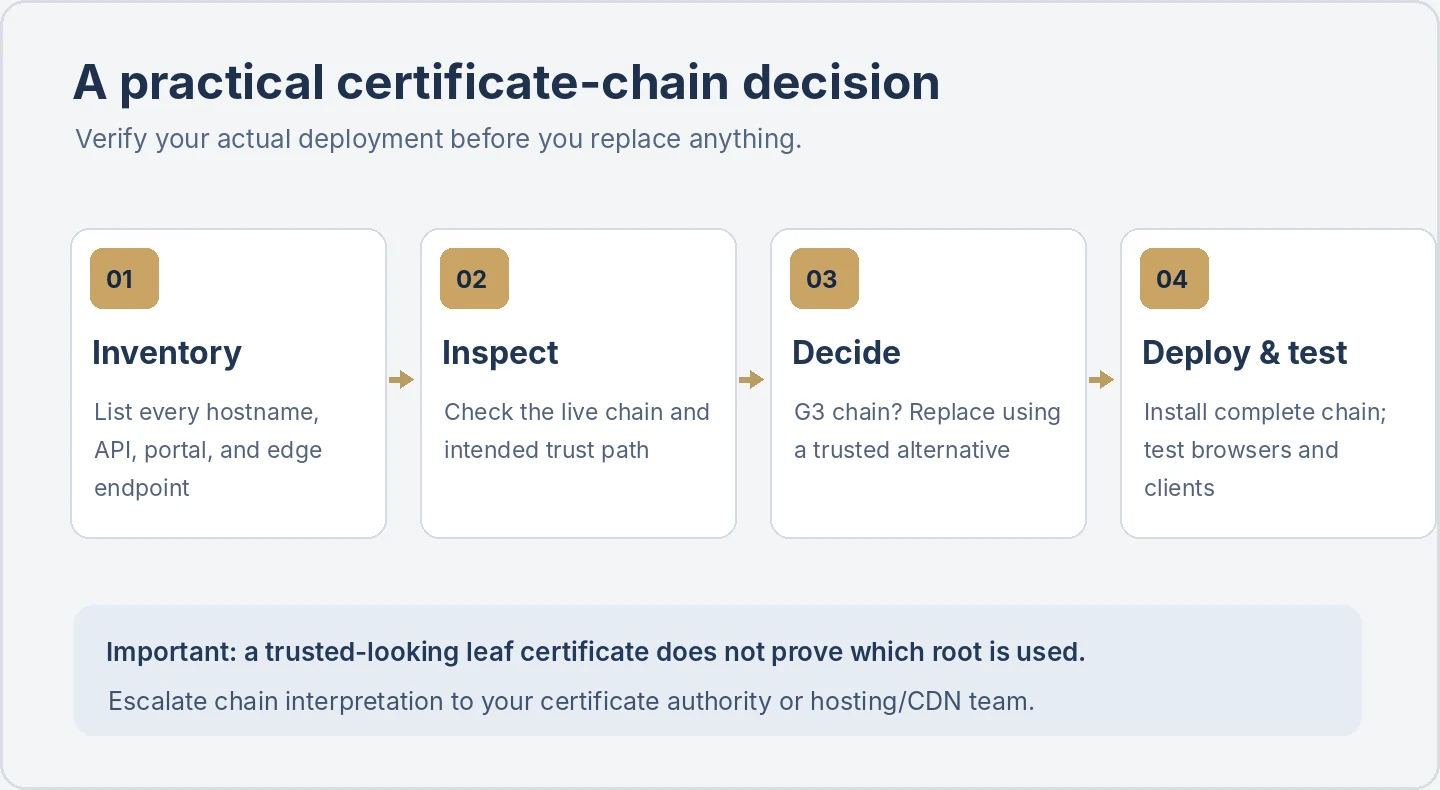
- Step 1: Inventory every public HTTPS endpoint
- Step 2: Inspect the certificate chain, not merely its expiry date
- Step 3: Decide whether replacement is urgent
- Step 4: Replace carefully, then test the complete path
- Example: one company website, three different certificate owners
- Seven-point website certificate review checklist
- Questions to send your hosting or SSL provider
- What UVs Digital Hub can help review
- Frequently asked questions
- Primary sources and further reading
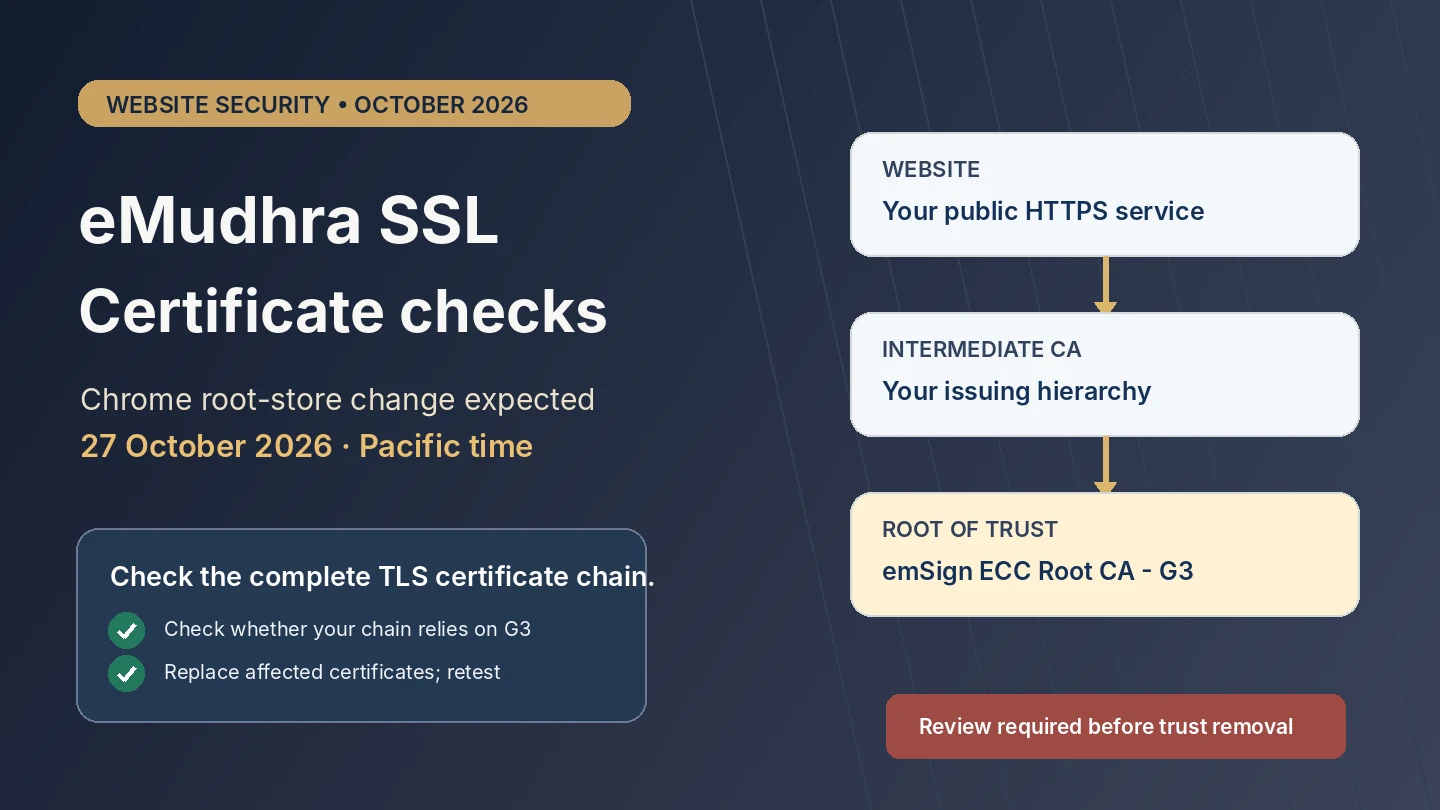
Quick answer: Google says its Chrome Root Store will stop trusting emSign ECC Root CA – G3 in a release expected Tuesday morning, 27 October 2026, Pacific Daylight Time. If your production HTTPS certificate chains to that root, Google advises you to obtain and install a certificate from a different trusted PKI hierarchy immediately. This is not a notice that every eMudhra-issued SSL certificate will stop working on that date. What matters is the chain used by each live hostname, not just the brand on the invoice. Google Chrome/Android security statement.
Many companies never inspect their SSL certificate after purchasing it. They know the domain displays a padlock, and assume the job is finished for the certificate’s lifetime. That can become a problem when a browser changes which certificate authorities it trusts.
This guide explains the immediate eMudhra incident, who should investigate, how to check the actual certificate chain, and what to ask a hosting company before replacing anything. It is a practical technical review, not a claim that UVs Digital Hub has inspected your specific website.
What changed, and when?
On 17 October 2026, security researchers reported that private keys associated with eight eMudhra intermediate CA certificates could be recovered because they had been generated with weak cryptographic randomness. Six intermediates could issue TLS website certificates, and two were intended for code signing. Chrome and Firefox moved quickly to block affected certificates using mechanisms that reach browsers without waiting for a full browser update. Google's security explanation; Mozilla's security statement.
On 20 October, Google announced the additional removal of emSign ECC Root CA – G3 from the Chrome Root Store to protect software that relies on the root list but does not receive the same real-time blocklist updates. Google expects that root removal to reach devices relying on the Chrome Root Store on 27 October 2026, morning PDT, with earlier availability on prerelease channels. Google.
On 22 October, eMudhra announced plans to exit its global SSL/TLS certificate business. That is a separate business decision; it is not equivalent to saying every certificate from its other roots becomes invalid on 27 October. eMudhra says it will continue revocation and certificate-status services until issued certificates expire or are replaced. Its 26 October incident update says alternate-certificate migrations are under way and that customers should use its support channels for the appropriate option. eMudhra business announcement; eMudhra incident updates.
| Date | Confirmed development | What a website owner should take from it |
|---|---|---|
| 17 October 2026 | Report of compromised keys; affected intermediates blocked by browsers | Keep client software patched and review any relevant certificate chain |
| 20 October 2026 | Google and Mozilla published incident and root-store actions | Identify whether your site relies on the affected G3 trust hierarchy |
| 22 October 2026 | eMudhra announced its exit from global SSL/TLS certificate issuance | Ask your provider about ongoing replacement and renewal plans |
| 27 October 2026 (expected, PDT) | Chrome Root Store removal of emSign ECC Root CA – G3 | Replace certificates that chain to that root before browser trust changes reach users |
Important distinction: a browser blocking compromised intermediates and a root-store removing an entire trust anchor are different actions. A legitimate website that did not use the compromised intermediates can nevertheless be affected if its otherwise-valid certificate depends on the removed root. That is why the full trust chain matters.
Do all eMudhra SSL certificates need immediate replacement?
No. The urgent instruction from Google names certificates chaining to emSign ECC Root CA – G3. Certificates issued under other trusted hierarchies must be evaluated on their own facts. eMudhra has said its G1 certificates remain active, while it is also offering alternative certificates and transitioning the SSL/TLS business. Google; eMudhra.
Do not decide solely from any of these shortcuts:
- The browser currently shows a padlock. That proves little about how the same chain will behave after a future root-store update.
- Your domain uses HTTPS or an auto-renewing certificate. Auto-renewal does not prove a new certificate will use a different trusted hierarchy.
- The leaf certificate displays a familiar reseller or CA name. Trust depends on the entire verified path, including intermediates and the root; cross-signing can complicate the picture.
- You checked only the homepage. Subdomains, API endpoints, admin portals and services behind different CDNs may present other certificates.
Step 1: Inventory every public HTTPS endpoint
Create a small list with the exact hostname, system owner, hosting or CDN provider, current certificate supplier and who can install a replacement. Include www and non-www versions, booking or payment sites, CRM and customer portals, mail-related web interfaces, staging environments reachable by customers, API endpoints and geographic/CDN edges where relevant.
This is particularly useful for businesses whose website was built by one vendor, hosted by another and secured through a CDN. A certificate that is managed by the CDN may not be the same one installed on your origin server.
Step 2: Inspect the certificate chain, not merely its expiry date
First, use your browser’s certificate viewer to examine the site’s issuer information and certification path. Record the names of the intermediates and the trusted root as the browser reports them. If the browser viewer does not reveal the whole path, ask your certificate authority, hosting company or CDN for the deployed chain and its trusted root.
An administrator familiar with command-line tools may capture the server-sent certificate chain using OpenSSL. Replace example.com with a hostname you own or administer:
openssl s_client -connect example.com:443 -servername example.com -showcerts </dev/null
This command can show the certificates the server sends, but many servers do not send their root certificate. Therefore, not seeing the G3 root in that output is not proof the certificate cannot chain to it. Browser trust stores and path-building can also differ. Ask the certificate provider to validate the complete trust path if you are uncertain.
Record the leaf certificate’s subject, issuer, notAfter expiry and the intermediate certificates, as well as the actual root of trust selected by relevant clients. Do not publish a screenshot containing private customer information, and never share a private key in a support ticket or chat.
Step 3: Decide whether replacement is urgent
If the deployed certificate chains to emSign ECC Root CA – G3, follow Google's urgent remediation advice: obtain and install a new certificate chaining to another publicly trusted hierarchy included in the Chrome Root Store. Ask the provider for explicit written confirmation of the replacement chain. Reissuing a certificate under the same distrusted root does not solve the trust problem.
If the chain does not use the affected root, do not claim it is unsafe or broken on 27 October simply because the brand is eMudhra. Still document the provider’s transition plan, because eMudhra announced an exit from the global SSL/TLS business. If there is uncertainty or cross-signing, have the responsible hosting/certificate team resolve the trust path rather than guessing from one screen.
Step 4: Replace carefully, then test the complete path
Before changing production settings, back up the certificate configuration and record the responsible change window. Ensure the new public certificate matches the intended hostname and has the correct intermediate bundle. Protect the private key using your established key-management process; do not email it or place it in a public website folder.
After deployment, test both the customer-facing hostname and relevant endpoints across current Chrome and Firefox, plus a second device or network where practical. Confirm you are seeing the new chain, not a cached or differently routed certificate. For a CDN, confirm the edge certificate and, where applicable, the origin certificate separately. Check logs for TLS handshake errors and monitor support messages after the change.
Do not bypass certificate warnings, disable verification, turn off HTTPS, or apply a browser-security exception merely to make a failing site load. Those workarounds hide rather than resolve trust problems.
Example: one company website, three different certificate owners
Imagine a small UAE service business with example.ae on managed hosting, app.example.ae behind a cloud load balancer and payments.example.ae provided by an external checkout platform. Even if the public website presents a trusted replacement certificate, the other two services may serve different chains. The business should check each responsible provider separately. This is an illustrative workflow, not a description of a UVs client or a claim that any real site is affected.
The same applies to India-based sites and international customer portals: the browser trust-store change is not limited to a country. The deciding factor is the certificate path presented to clients using the affected root store.
Seven-point website certificate review checklist
- List all hostnames. Include external services and distinct CDN/hosting environments.
- Capture the deployed chain. Use browser certificate information or provider support to identify the actual root.
- Confirm the G3 exposure. Specifically ask whether the chain depends on
emSign ECC Root CA - G3. - Arrange the correct replacement if needed. Require a different trusted PKI hierarchy, not only a new expiry date.
- Test externally. Check Chrome and other relevant clients after the new certificate and complete chain are installed.
- Monitor and document. Watch TLS errors and record the issuing CA, expiry, owner and future renewal process.
- Review the longer-term supplier plan. Ask the certificate issuer or reseller what eMudhra’s exit means for support and renewals.
Questions to send your hosting or SSL provider
You can copy this short note into a support ticket:
Please confirm whether any certificate used for our domain(s) chains to
emSign ECC Root CA - G3, which Google expects to remove from the Chrome Root Store on 27 October 2026 PDT. If affected, please advise the replacement CA hierarchy, installation plan, expected service impact and how you will verify Chrome compatibility after the change. Please include all CDN and origin endpoints you manage.
Keep the request specific. A generic reply that your SSL certificate is 'valid until next year' does not address browser trust.
What UVs Digital Hub can help review
UVs Digital Hub works with website development, website maintenance and technical support and business software integrations. A useful first step is to list the domains, hosting environments and responsible parties; identify which certificate changes must happen at the hosting or CDN provider; then agree how the site and its connected apps will be tested after any migration.
We do not claim to be the affected certificate authority, a browser root programme or your certificate issuer. We cannot certify that a particular website is safe without inspecting its actual deployment and testing the relevant clients. If your hosting provider needs a specific SSL migration plan, share your setup with UVs Digital Hub.
Frequently asked questions
Is 27 October 2026 a deadline for every website?
No. It is Google's expected Chrome Root Store rollout date for removal of a particular eMudhra root, expressed in Pacific Daylight Time, not a universal certificate renewal deadline. Only sites depending on affected trust paths face that specific urgent compatibility issue.
Is eMudhra's digital signature or eSign service affected?
The provider and India's CERT-In distinguish the global TLS incident from its digital-signature/eSign services and enterprise applications, which they report as unaffected. This article is about website HTTPS certificates, not electronic signing or DSC issuance. eMudhra; CERT-In advisory.
Will renewing my existing certificate fix the problem?
Only if the replacement chains to a trusted PKI hierarchy. A later expiry date by itself cannot restore trust in a root that a browser has removed.
Is checking openssl s_client enough?
No. It is a useful starting point for administrators, but server-sent chains frequently exclude the root and client trust stores can build alternative paths. Cross-check the chain with your provider and representative clients.
Does this mean attackers accessed eMudhra customers' website data?
Not based on the cited incident statements. Google and Mozilla identified recoverable intermediate CA keys; eMudhra says it has not found an infrastructure or customer-data breach and reported no end-entity certificates from the affected intermediates. These are separate assertions and investigations may continue. eMudhra update, 26 October.
Primary sources and further reading
- Google Security Blog — Protecting Chrome and Android users (20 October 2026)
- Mozilla Security Blog — Firefox and affected intermediates (20 October 2026)
- eMudhra — Global SSL/TLS business exit announcement (22 October 2026)
- eMudhra — Incident updates, latest 26 October 2026
- CERT-In — eMudhra Intermediate CA Certificates advisory (21 October 2026)