
On this page
- Membership expiry is an operating event, not just a date
- 1. Calculate the expiry from the membership record you actually sell
- 2. Start reminders before the member expires
- 3. Separate membership status from payment status
- 4. Make access control read the membership rule
- 5. Handle grace periods and freezes explicitly
- 6. Use WhatsApp automation for the routine, not the whole relationship
- 7. A successful renewal should update every dependent workflow once
- What the gym dashboard should show every day
- When biometrics are optional
- The practical automation sequence
Membership renewal is one of those gym jobs that looks simple until the member record, payment, access control and WhatsApp reminders all disagree. A good automation does not just send messages. It keeps the membership state consistent across the operation.
Automate the repeatable parts—expiry detection, reminders, payment follow-up and access-state updates—but keep freezes, complaints, plan changes and unusual cases easy for staff to take over.
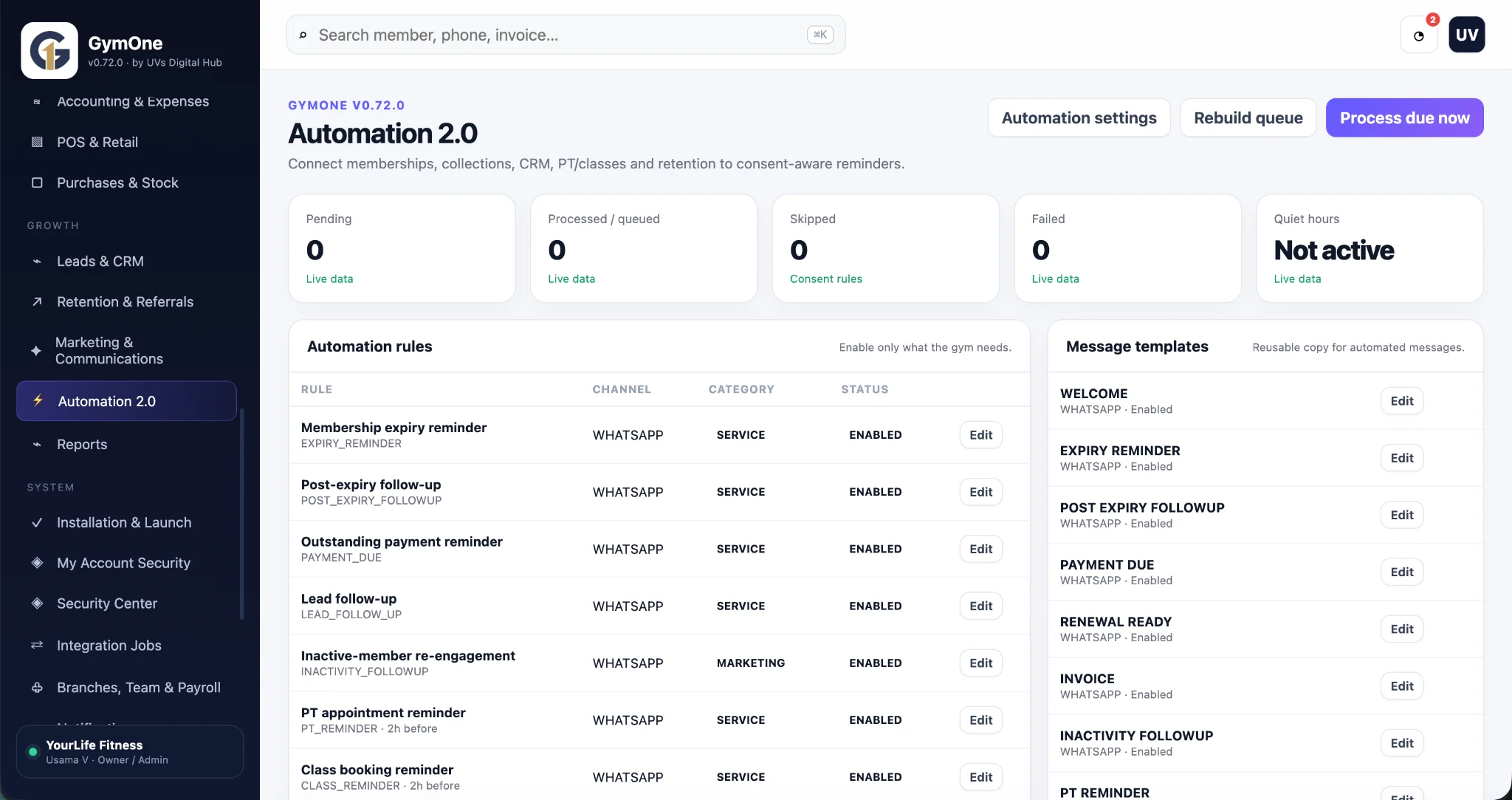
Membership expiry is an operating event, not just a date
A membership end date touches several parts of a gym at once: billing, front desk, access control, class/PT bookings, customer communication and renewal reporting. If each of those works from a different spreadsheet or person’s memory, the gym can remind a member too late, collect payment without extending access, or allow an expired membership through the door.
A stronger system treats expiry as an event that changes state. The software knows the member’s plan, end date, outstanding amount, freeze/grace rules and access status, then triggers the right next action.
1. Calculate the expiry from the membership record you actually sell
Do not store only a free-text expiry date. Keep the plan, start date, duration, pauses/freezes and renewal history so the end date can be explained later.
If your gym supports monthly, quarterly, annual, PT-only or class packages, define how each behaves. A membership with frozen days should not be treated exactly like one that ran continuously.
2. Start reminders before the member expires
A useful reminder sequence gives the member time to act. For example, a gym might send reminders seven days, three days and one day before expiry, then a different follow-up after expiry. That is only a starting pattern; the right schedule depends on your gym and communication policy.
The message should make the next step clear: reply, pay, speak to reception or choose a renewal option. Sending “your membership is expiring” without an action simply creates another task for the front desk.
3. Separate membership status from payment status
A payment can fail while the membership is still active; a payment can be received while the renewal has not yet been applied correctly. Store the two states separately.
Useful status examples include Active, Expiring, Expired, Frozen and Cancelled for membership, plus Paid, Part-paid, Due or Failed for collection. The exact labels can differ, but the system should not use one field to mean everything.
4. Make access control read the membership rule
If a gym uses fingerprint, face, QR or another access method, the device should not be the authority on membership validity. The business system should decide whether the member is allowed in, and the device should enforce that decision.
That makes rules such as grace periods, freezes or manual overrides visible in one place. It also prevents a front desk team from maintaining a separate “allowed” list that drifts away from billing.
5. Handle grace periods and freezes explicitly
Many gyms need exceptions. A member may have an agreed freeze, a short grace period, a medical hold or a pending payment that management has authorised.
Do not solve exceptions by changing the end date with no note. Store the reason, start/end of the exception, who approved it and what happens to access and reminders during that period.
6. Use WhatsApp automation for the routine, not the whole relationship
Renewal reminders, PT appointments, class bookings and outstanding-payment nudges are good candidates for automation because the trigger is clear. The message can include the member’s relevant date or action and then hand over to staff when the member replies with a question.
Do not trap the member in a bot. A renewal conversation can quickly become a plan change, freeze request or complaint. Automation should recognise the handoff point and keep the team informed.
7. A successful renewal should update every dependent workflow once
When the renewal is completed, the system should extend the membership, update the amount/payment record, restore or continue access, stop old expiry reminders and place the member into the correct future reminder sequence.
The important word is once. If reception updates billing, then manually updates access, then manually edits a reminder spreadsheet, one of those three will eventually be missed.
What the gym dashboard should show every day
A useful dashboard does not need fifty charts. It should surface operational questions that someone will act on today.
- Members expiring in the next 7 days.
- Expired members awaiting follow-up.
- Outstanding membership payments.
- Today's check-ins and members currently inside where applicable.
- Failed or skipped automation jobs.
- Upcoming PT/class reminders.
- Recent renewal activity and exceptions.
When biometrics are optional
Not every gym needs fingerprint or face access. Reception-only gyms may be perfectly served by manual, QR or simple check-in. Treat biometric hardware as an adapter to the membership system, not as the product itself.
That makes the software easier to deploy across different gym models. A branch can use the same membership, billing and automation rules whether it has a biometric device, turnstile or a staff-controlled entrance.
The practical automation sequence
A straightforward flow is: membership approaches expiry → reminder queued → member renews or replies → staff/system records payment → membership extended → access remains active → future reminders recalculated.
For a non-renewal, the path is different: expiry → access rule changes → post-expiry follow-up → retention task or inactive-member campaign where appropriate. The workflow should reflect the member’s actual status instead of continuing to send the same reminder forever.
GymOne is being built around connected membership, billing, attendance, leads/CRM, PT/classes and automation. The expiry workflow described here reflects that product work, including renewal reminders, outstanding-payment reminders, inactive-member follow-up and optional hardware/access-control integration.
Common questions
How many expiry reminders should a gym send?
There is no universal number. Start with a small sequence before expiry, review response and opt-out behaviour, and adjust. The important part is that reminders stop or change when the member renews or asks for help.
Should an expired member be blocked automatically?
That depends on the gym’s policy. If automated access control is used, the software should apply the documented rule—including any grace period or authorised override—rather than making the decision inside the device.
Can the same automation handle PT and class reminders?
The automation engine can be shared, but the triggers and message logic should be different. Membership expiry, PT appointments and class bookings are separate business events.