
On this page
- VAT-inclusive and VAT-exclusive are two different inputs
- Why a billing system can change the agreed total
- What about prices displayed to customers?
- Eight tests to run before accepting the software
- Test discounts without subtracting the tax twice
- Why line-level rounding needs its own test
- Keep tax treatment separate from price-entry mode
- Check the invoice, not just the calculator
- What to ask the software provider to demonstrate
- Frequently asked questions
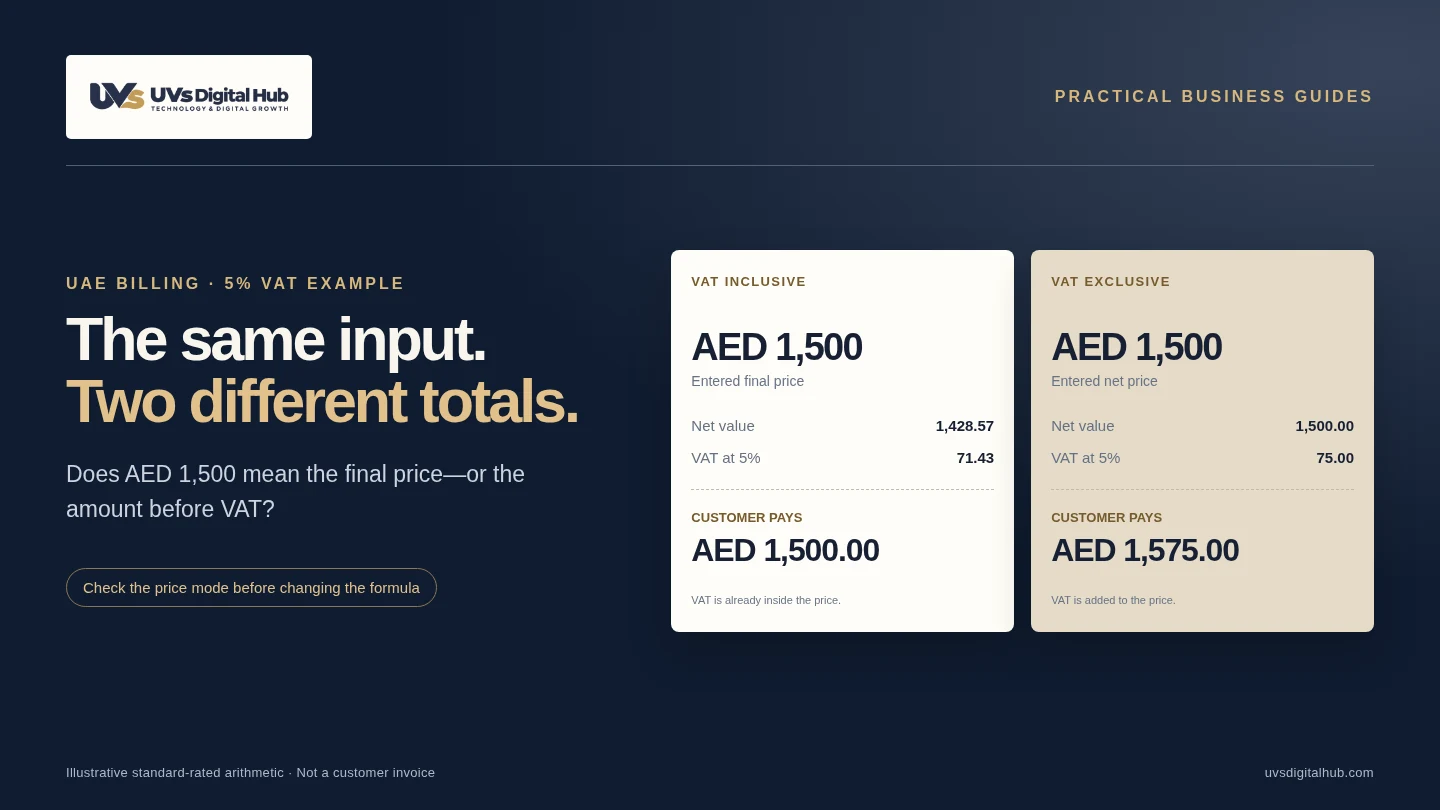
You agree a final price of AED 1,500 with a customer. The cashier types 1,500 into the billing system, clicks Save, and the invoice becomes AED 1,575. The extra AED 75 is not necessarily a broken calculator. The software may have treated the price as VAT-exclusive when you intended it to include VAT.
That is the first distinction to test. A clear amount field, a visible tax mode and a reliable calculation preview are more useful than a reassuring “VAT ready” label on a product brochure.
If AED 1,500 is the final price including 5% VAT, the VAT component is AED 71.43 and the net value is AED 1,428.57. If AED 1,500 is the price before VAT, the total becomes AED 1,575.00.
Scope: illustrative software tests for a UAE VAT-registered supplier making an ordinary 5% standard-rated supply. These examples do not determine the tax treatment of your business or every transaction. Confirm special cases with a qualified UAE tax adviser.
VAT-inclusive and VAT-exclusive are two different inputs
Inclusive means tax is already within the entered price. Exclusive means tax is added to it. For this guide’s 5% examples, the calculations are:
Inclusive: VAT = final price × 5 ÷ 105
Net value = final price − rounded VAT
Exclusive: VAT = net price × 5 ÷ 100
Final price = net price + rounded VAT
For a single AED 1,500 inclusive line, 1,500 × 5 ÷ 105 gives AED 71.42857…, rounded to AED 71.43. Subtracting that tax from the final price leaves AED 1,428.57. Calculating 5% of AED 1,500 instead produces AED 75, which is the tax on an exclusive AED 1,500 price.
The FTA’s Tax Invoices clarification, VATP006, distinguishes gross and net invoice presentation and explains line-level rounding. The FTA VAT overview is the official starting point for the UAE’s standard rate.
Check a single-line example
For a standard-rated 5% supply only. This calculator does not classify transactions or validate an invoice.
Why a billing system can change the agreed total
Check the meaning of the amount field before blaming the tax formula. The same screen can be affected by a company default, an item-level setting, a customer price list or an imported product record. A preview may use one setting while the saved invoice uses another.
Our recommended investigation starts with one simple sale and follows it through four places: the data-entry screen, the saved invoice, the printed receipt and the sales export. Record the entered amount and selected mode at each stage. If the result changes, you now have a reproducible problem instead of a vague complaint that “VAT is wrong”.
Also check whether a quote-to-invoice conversion preserves the original price meaning. A quotation for a fixed final price should not silently become an exclusive amount when another team creates the invoice. The interface should make any proposed change visible before it affects the customer.
What about prices displayed to customers?
Article 27 of the VAT Executive Regulation generally requires published prices for taxable supplies to include VAT. It permits specified exceptions, including exports and supplies to VAT registrants, with clear exclusive-price identification; separate reverse-charge cases also apply. A software toggle does not decide which legal rule fits the transaction. Source: current Executive Regulation, Article 27.
In practice, align the quotation, menu or price list with the till. Staff should not need to guess whether an advertised amount is final. Use specific labels such as “Price including VAT” and “Price excluding VAT”, rather than a bare “Amount” beside a small hidden checkbox.
Eight tests to run before accepting the software
The following tests are implementation recommendations. Use a non-production environment or approved test workflow; do not create fictitious transactions in live statutory records. The monetary examples assume the ordinary standard-rated transaction described above.
| Test | Input or action | Expected outcome |
|---|---|---|
| 1. Inclusive price | AED 1,500; 5%; inclusive | Net 1,428.57; VAT 71.43; total 1,500.00 |
| 2. Exclusive price | AED 1,500; 5%; exclusive | Net 1,500.00; VAT 75.00; total 1,575.00 |
| 3. Percentage discount | 10% qualifying discount on AED 1,500 gross | Total 1,350.00; VAT 64.29; net 1,285.71 |
| 4. Fixed gross discount | AED 100 qualifying discount on AED 1,500 gross | Total 1,400.00; VAT 66.67; net 1,333.33 |
| 5. Quantity behaviour | One line: 3 × AED 10 inclusive | Total 30.00; line VAT 1.43; net 28.57 |
| 6. Tax categories | Use adviser-approved standard, zero-rated and exempt examples | Distinct classification and reporting; no generic “No VAT” bucket |
| 7. Credit or refund | Test an approved full correction of the inclusive example | Traceable link to original; 1,500.00 gross and 71.43 VAT reversed where applicable |
| 8. End-to-end consistency | Save, reopen, print and export the same test invoice | The stored amounts, tax basis and totals remain consistent |
Record actual outcomes and evidence beside each expected result. A successful demonstration on the vendor’s laptop is not the same as acceptance in your installed version, with your price lists, printer template and accounting export.
Test discounts without subtracting the tax twice
For a supplier-funded discount that benefits the customer, Article 28 sets the conditions for reducing the value of supply. Vouchers and other arrangements can need different treatment. The examples here assume the discount qualifies and reduces the gross amount before the final invoice calculation. Source: Article 28.
Take AED 1,500 including VAT and apply a 10% discount to that gross price. The customer pays AED 1,350. The tax component is 1,350 × 5 ÷ 105 = AED 64.29 after rounding; the net value is AED 1,285.71. Do not deduct another 5% from AED 1,350. VAT extraction and discounting are different operations.
A fixed “AED 100 discount” also needs a clear basis. Does it reduce the customer’s gross payment by AED 100, or the net selling price by AED 100? Those are different instructions. Label the basis and keep it in the saved record.
A 100% discount should not be assumed to mean no VAT in every circumstance. Free supplies, deemed-supply rules and the nature of the promotion require separate review. Test that the software can flag the situation rather than silently treating every zero-payment transaction identically.
Why line-level rounding needs its own test
VATP006 explains mathematical rounding to the nearest fils and, for full tax invoices, applying rounding line by line. Do not round in one place for the receipt and another for the accounting export. Source: FTA rounding clarification.
For example, three separate AED 10 inclusive lines each contain AED 0.47619… VAT, rounding to AED 0.48 per line. Their displayed VAT totals AED 1.44. One combined AED 30 inclusive line gives AED 1.42857…, rounding to AED 1.43. The line structure changes the rounding point; that is why a one-fils difference should be investigated, not “fixed” by deleting tax.
Ask the developer to document the calculation order: quantity, qualifying discount, tax basis, rounding and final totals. For implementation, decimal arithmetic or integer minor units is safer than relying on unqualified binary floating-point rounding. Preserve the authorised calculation policy in tests so a future update does not change it silently.
Keep tax treatment separate from price-entry mode
“Inclusive” and “exclusive” describe the price basis. “Standard-rated”, “zero-rated” and “exempt” describe tax treatment. A good implementation keeps those decisions separate instead of using a single switch for both.
The legal categories and conditions appear in the FTA’s current VAT legislation. Do not use an exempt or zero-rate selection merely to force a receipt to equal the price you promised. Correct the price basis after confirming the actual treatment.
For system acceptance, ask your adviser for a short approved tax-code matrix. Then verify how each code appears in sales reports and accounting mappings. When a transaction needs review, retain that status rather than forcing it into a convenient category. A non-registered supplier should not switch on tax collection simply because the software offers it.
Check the invoice, not just the calculator
A correct amount is only one part of a usable invoice. Check the document type and applicable required fields, including supplier details and TRN, date, description and total/tax information. Full and simplified invoice requirements differ. Use Article 59 and the FTA clarification for the relevant format, rather than a decorative template alone. Source: Article 59.
Print a realistic multi-item invoice on the actual device used by staff. Check that discounts, tax amounts and totals remain legible, and that a long description does not push important figures out of view. Repeat the test on a PDF export, then reconcile the transaction to the sales report.
For a full refund or correction, test the approved credit-note workflow and its link to the original transaction. Do not simply edit a posted invoice until its figures look right. Your finance team should agree the correction process before it is configured.
VAT arithmetic is also separate from eInvoicing readiness. A correct VAT total does not demonstrate structured invoice exchange or provider integration. Our UAE eInvoicing software-readiness guide covers that separate project.
What to ask the software provider to demonstrate
Ask for one witnessed run of the eight tests using your intended configuration. Keep the software version, settings, expected numbers, actual numbers and screenshots together. Name a finance approver and a technical owner so responsibility does not sit vaguely with “the system”.
Accept the workflow only when the invoice, receipt, report and export agree—or when a documented rounding rule explains a legitimate difference. Record unresolved cases. A clear limitation is preferable to a claim that every transaction is covered.
UVs Digital Hub works on billing and business-software workflows and POS implementations. Share your price lists, invoice types, discount rules and reporting needs for a scoped review. Discuss your billing requirements. Tax treatment and compliance approval should come from your qualified adviser.
Frequently asked questions
What is the VAT inside AED 1,500?
For the single-line, 5% VAT-inclusive example, it is AED 71.43. The net amount is AED 1,428.57 and the customer’s total remains AED 1,500.00.
When is AED 1,575 the correct total?
When AED 1,500 is the agreed net price and 5% VAT is properly added to it. It is not the correct result merely because the software defaults to an exclusive price field.
Can I select “No VAT” to preserve the final price?
No. Preserve the correct final price by applying the appropriate price basis and tax treatment. A display preference should not replace tax classification.
Will the downloadable test sheet certify my software?
No. It is an arithmetic and acceptance-testing aid. It does not certify a product, determine every tax outcome or replace professional review.
Primary sources and editorial scope
Sources checked on 23 October 2026. Examples and checklists are implementation guidance; they are not customer results or a guarantee of performance or regulatory compliance.
- Federal Tax Authority — Tax Invoices clarification, VATP006 (invoice presentation and rounding)
- Federal Tax Authority — Current VAT legislation and Executive Regulation
- Federal Tax Authority — Consolidated Executive Regulation, Articles 27, 28, 59 and 61 (September 2026 publication)
- Federal Tax Authority — What is VAT?